Security Architecture
Warning
This security architecture is still a work in progress. Comments and feedback are welcome. Discuss it on Github
Preliminaries
The best is the enemy of the good.
The architecture presented here can be seen as a general overview of what any modern Linux security construction may want to achieve.
Examples of current Linux distributions implementing something similar with various use cases in mind are:
A careful reader would have noticed that the common ground among these distributions is to be constituted of a fully immutable core system. If such a construction is probably the future of Linux, as of today it can raise some usability concerns (cf Rqr ). Therefore, the current project proposes a pragmatic long term solution:
- We acknowledge the end goal needs to be fully compatible with systems that respect 100% of the security model presented here.
- We stay compatible with a "classic" Linux construction (i.e. without immutable core), and try to implement as much as we can on classic distributions. It is considered a transitional state.
Security Architecture
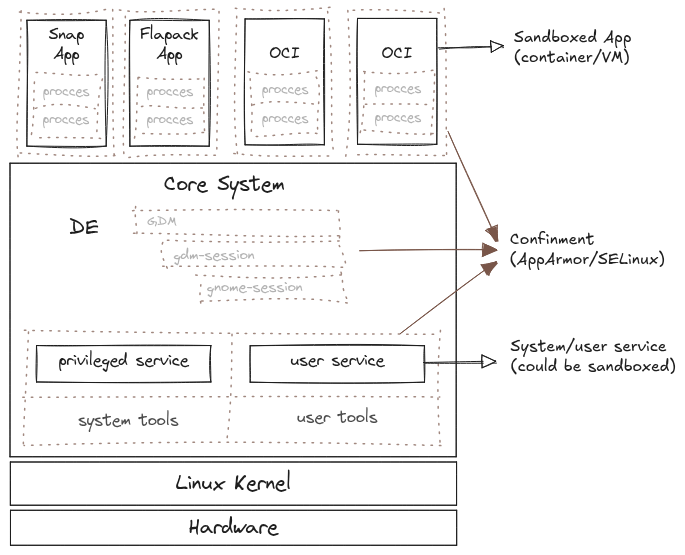
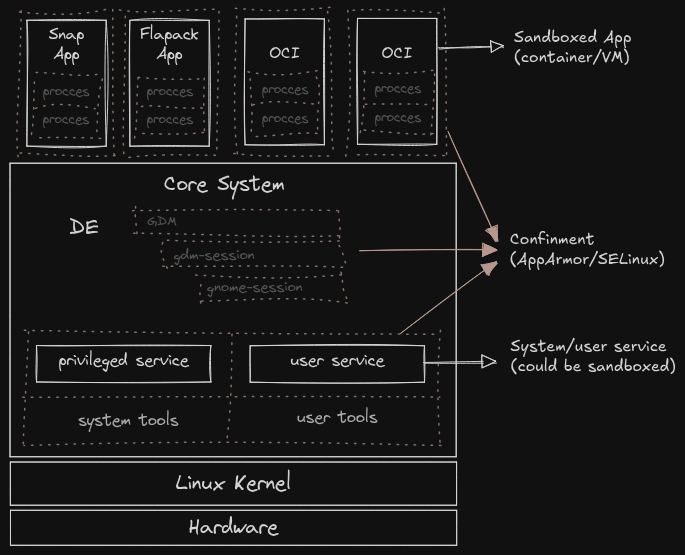
As attackers usually come from the top (a high level application) and go down to the core system, we present the security architecture similarly.
-
In application sandboxing: separation of privilege, least privilege principle, within different processes of the application itself. It can be implemented using tools such as: Landlock, bwrap, and AppArmor. The purpose is to separate highly privileged code from the rest of the application. Eg: pacman, VLC, Chrome sandboxing, loupe.
-
Application sandboxing: Isolate the application from the rest of the system with tools such as. In this context, "sandboxing" does not refer to a special technology, but to the general concept. It can be implemented in various ways: trough VM (Qemu/KVM, Firecracker, Cloudhypervisor, Kata Containers), or container (Docker, gVisor, Flatpak, Snap) with different level of isolation and integration with the rest of the system.
-
Confined user: The user is confined in its own environment. Limiting what they can do .
-
System confinement: separation of privilege, the least privilege principle, within all part of the core system. For example, Gnome is constituted by about 50 small services running in the background. Each of them are confined independently with granular access to other part of the DE.
Security Levels
As apparmor.d can be used in multiple security model, it provides different mode to fit into the following proposed security target.
Targets
default
This confinement level can be summarized as the most we can do without requiring user configuration. It provides a good level of security for most use cases while requiring minimal configuration from the user. It is suitable for general purpose use. The goal with this level is that the end user should not be aware of AppArmor and its configuration.
- Principle of least privilege applied
- Strict Principle Of Least Astonishment (POLA)
strict
Stronger confinement for applications. Suitable for more sensitive use cases. This level includes a few sublevel depending on how the user want to configure it.
fsp
Full System Policy confinement for applications. Suitable for very high security use cases.
extreme
Maximum confinement for applications. Suitable for the most extreme security use cases. This level may break some applications and require significant user and application configuration as well as patching some applications to work properly. The goal is to provide a kind of Multi Category Security (MCS) using apparmor on top of the FSP model. This mode is only tested/supported on immutable systems.
Ecosystem Requirements
Ecosystem Requirements are applied regardless of the selected security mode. However, they may be implemented differently depending on the mode. For example:
- In
defaultmode a user shall install any app (including privileged), they will run (even unconfined). -
In
fspmode, a user shall:- Install any user app, they will be confined (with a default UI profile if no specific profile exists).
- Install privileged app/service. They will have to provide a corresponding profile or the service won't be able to run.
-
In
extrememode, only pre-approved apps (user or system) are allowed to run. All apps must have a corresponding profile. Personalization, is possible but for each app or service an apparmor rule must be defined to allow the service to start.